

Native apps from app stores are often unnecessary. In many cases, Progressive Web Apps (PWAs) offer the same functionality, can be more resource-efficient, are better for privacy, and don’t require an app store intermediary.
Websites can be installed with just a few gestures and are then available as PWAs on the home screen. Push notifications can be received on all device types this way. When properly implemented, websites and PWAs can even work offline. All of this is possible without having to install apps via the App Store or Play Store.
This approach benefits website operators, as the installation happens directly on the website in the browser, reducing bounce rates. However, this post primarily aims to highlight the advantages for PWA users.
Take the YouTube PWA, for example. It allows you to watch YouTube content with an active ad/privacy blocker. This is a real win if you want to avoid spam ads. It’s even possible to watch anonymously without making major compromises in user experience. You can follow channels and accounts via feed readers and stay updated without revealing too much about your preferences to Google.
Disclaimer: I don’t find it reprehensible for creators to earn money through advertising on the internet. Quite the opposite. Personally, however, I try to block ads using ad blockers and instead attempt to support creators in other ways. Preferably in a manner where no intermediaries disproportionately profit and my privacy isn’t compromised by sharing data with third parties.
App Store Apps Should Be Avoided
Compared to websites, native apps collect far more data and have significantly more access permissions to device functions and hardware. With PWAs the browser acts as a protective shield against unwanted permissions while still allowing access to many system interfaces when users grant consent. Read more in the blog post Native Apps Should Be Avoided Whenever Possible on nooneshappy.com.
Installing Web Apps
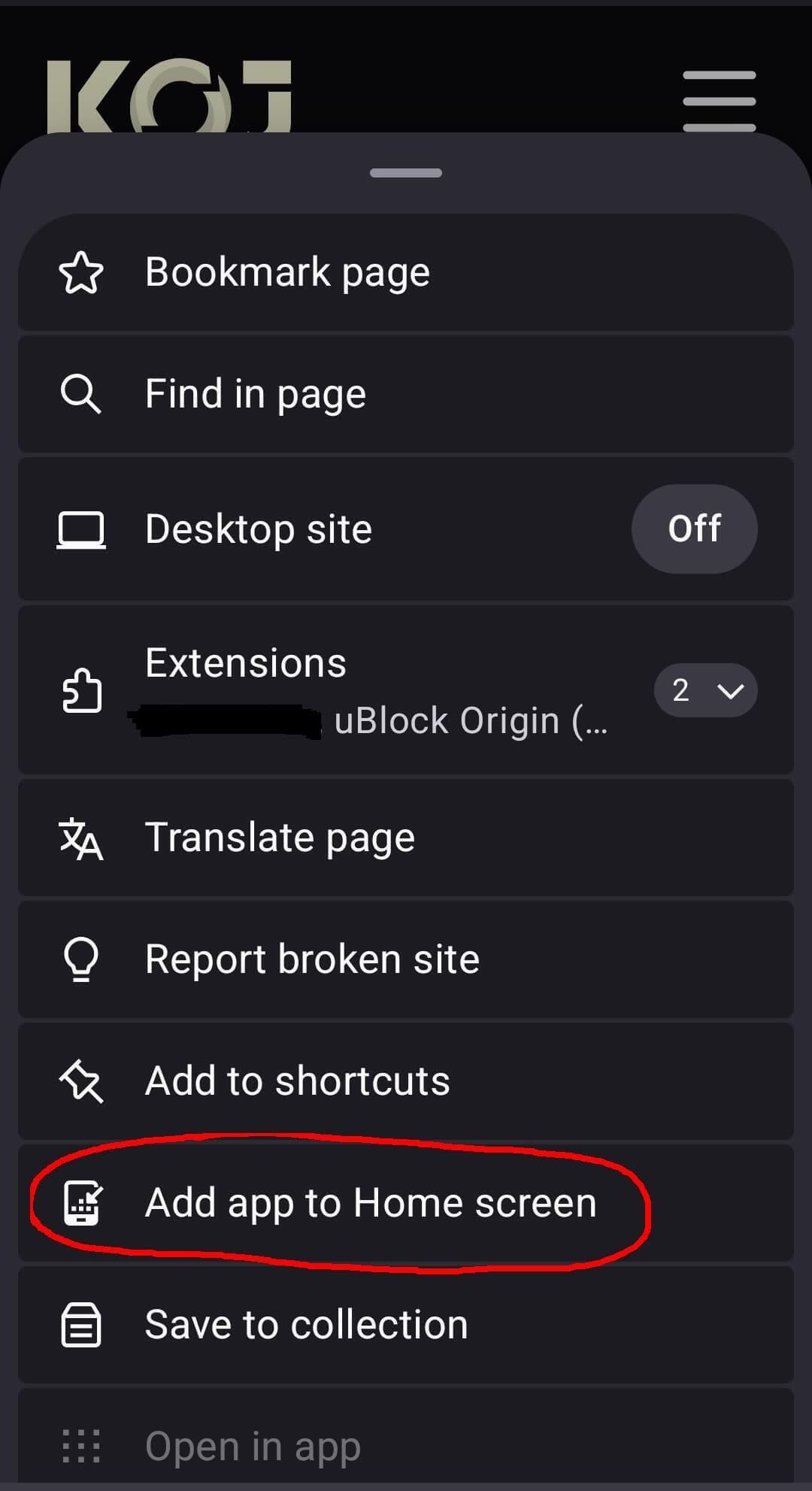
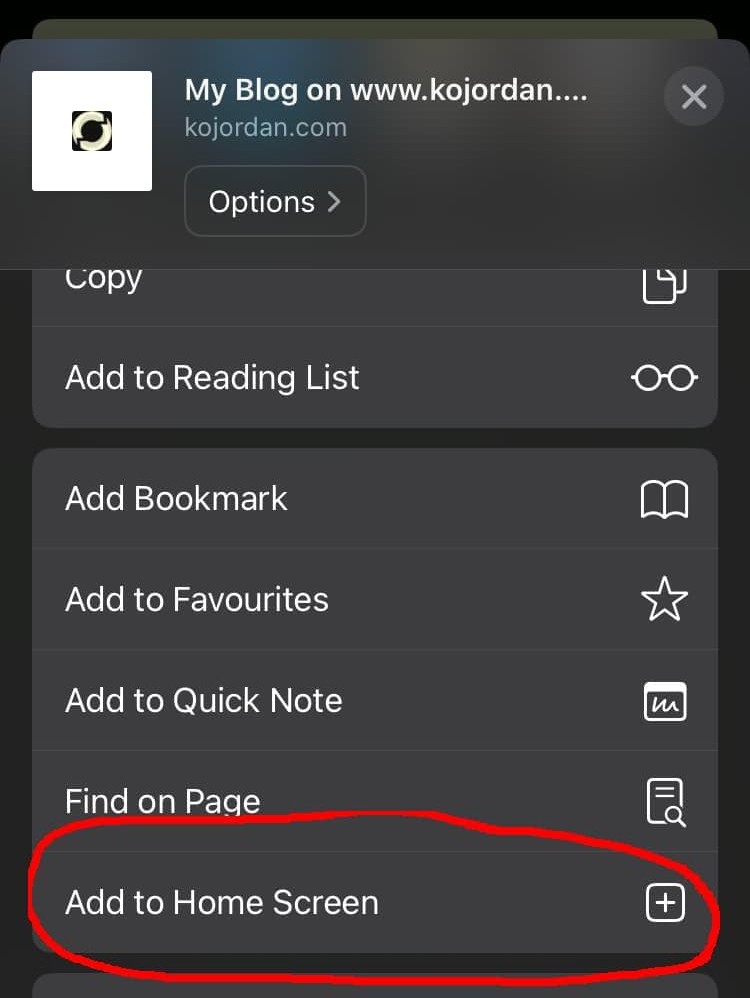
Any website can be installed as a PWA these days. This applies even to websites that don’t actively promote this feature. The installation process is incredibly simple.

Apple Doesn’t Play Fair
Apple is not a big fan of PWAs and, at one point, completely removed support for them. Only after pressure from the DMA team were PWAs reinstated. Unfortunately, Apple continues to act unfairly, driven by profit motives, and tries to keep PWAs as limited as possible. After all, Apple takes a 30% cut from apps distributed through its store, whereas PWAs bypass this revenue stream. Apple justifies its actions with arguments about user protection, but these claims are hypocritical, as you can read below or in the blog post series Browser Choice Must Matter by Alex Russell, one of the driving forces behind PWAs and the open web in general.
Advantages of Progressive Web Apps
As mentioned, PWAs offer significant benefits for both developers and users. Below are what I consider the most important advantages.
✅ Customized UX Thanks to Browser Settings
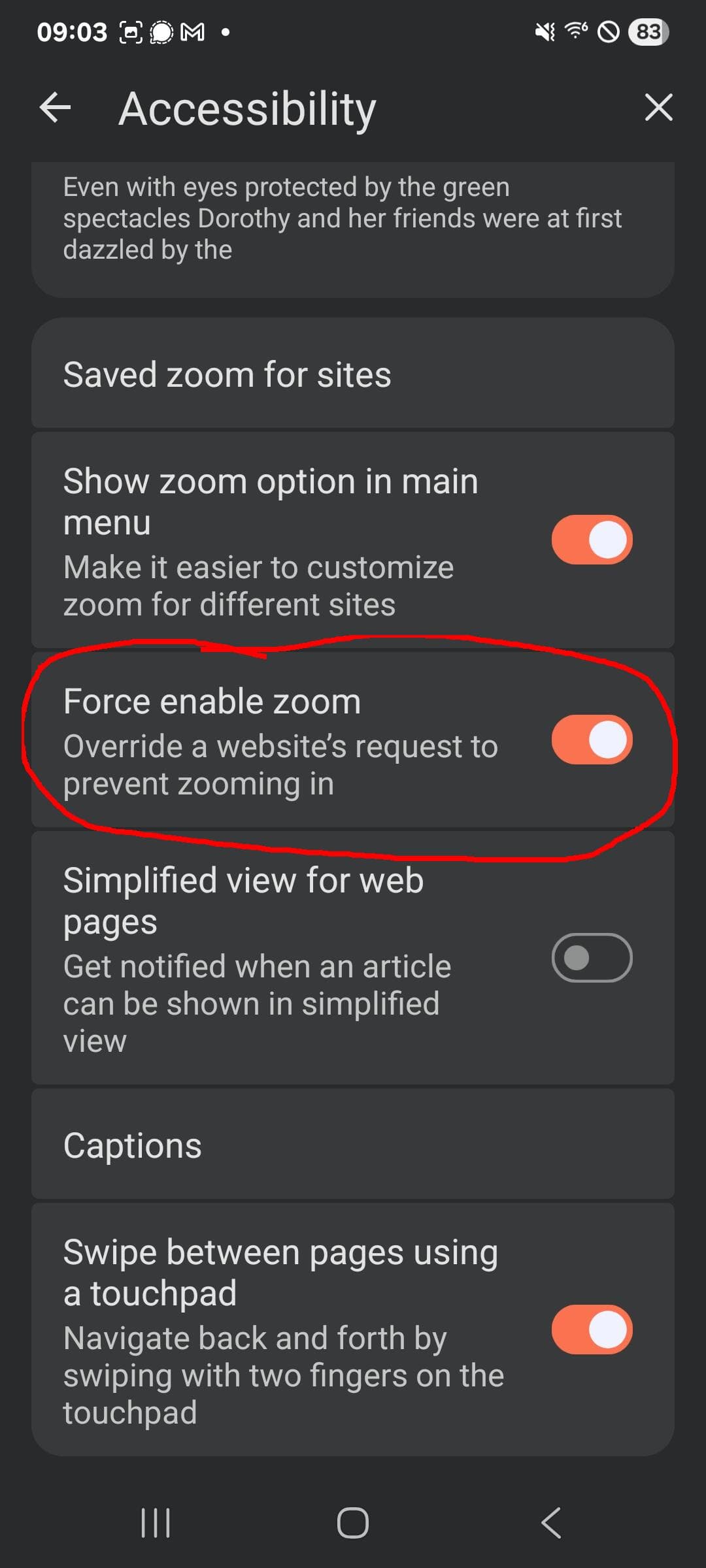
PWAs adopt the browser’s settings, and plugins activated in the browser also affect PWAs. Whether it’s ad blocking, the ability to enforce zoom, or other accessibility extensions, the experience can be tailored to individual needs. Users are not forced to accept the imposed UX of native apps.
Who hasn’t been annoyed by an app that disables two-finger zoom?! Safari allows zooming in the browser by default, and in other browsers, you can enforce zoom through settings.
✅ Enhanced Privacy
If privacy is a priority for you, PWAs are almost always the better choice compared to native apps.
The privacy-enhancing features of many browsers (Firefox, Vivaldi, Mullvad, Brave) also apply to PWAs, preventing data collection or sharing with third parties.
Additionally, in Firefox-based browsers, push notifications are not sent to Google, Microsoft, or Apple servers. Instead, they use alternative interfaces.
Many online services that require login when using the native app can be used anonymously via PWAs, and session cookies can be deleted at any time.
✅ Lower Storage Requirements
Properly implemented PWAs save storage space because only the necessary resources are downloaded initially. Native apps, on the other hand, often download more data upfront to ensure full offline availability.
✅ Quick Installation
While native apps must be searched for and installed via the app store, PWAs can be installed directly from the website. This saves users extra steps and reduces bounce rates for operators, as several studies show.
✅ No App Store Censorship
PWAs bypass the gatekeepers of app stores. While one might argue that gatekeepers help maintain a clean mobile ecosystem, history shows that these gatekeepers primarily serve their own interests and profits, with user protection often used as a pretext.
A prominent example of gatekeepers failing in their oversight duties is the intolerable manipulation and sexualization of images (sometimes of minors) by Grok on Twitter/X.
Another example is when gatekeepers banned useful apps in their own interest, such as ICE alert systems that warned communities about raids. Here, the favor of the US regime likely took precedence. PWAs can simply be installed on devices without any intermediaries interfering. This is why at least one ICE alert system is now available as a PWA.
✅ Interesting for Developers: Decentralized Services Don’t Need a Central Frontend
A service that encourages self-hosting often faces the challenge of different instances running different versions. If you want to offer a central app in the app store, it must be compatible with all supported versions. This leads to either high maintenance efforts or short support cycles for individual versions. PWAs circumvent this issue because each PWA depends on the respective decentralized instance. For this reason, the collaborative office suite CryptPad relies on PWAs.
Disadvantages of PWAs
To be fair, I should also mention some of the weaknesses of PWAs.
❎ Slimmed-Down Version of the App
Operators sometimes only offer a stripped-down version of their service on the website (and thus the PWA). This is especially true if operators believe there are advantages to users choosing the app instead—perhaps to achieve greater lock-in effects or to have more tracking and advertising opportunities.
To increase accessibility, the stripped-down version is offered on the website, but the full feature set only becomes available after installing the native app.
Sometimes, it’s simply a lack of commitment behind the less functional web version.
However, it could also be that the native app uses features not available in the PWA. Web standards in this regard have advanced significantly, but browsers have lagged in implementation. Over time, PWAs gain more potential, and operators’ excuses become less valid.
❎ Careless Implementation Leads to High Data Usage and Offline Limitations
If websites are implemented carelessly (and many are, as I speak from experience), they consume more data than their native counterparts. Caching, which is often automatically considered for native apps to ensure offline availability, may be poorly implemented on websites not designed as PWAs. This can lead to increased data transfer.
Poor caching also affects the offline availability of web apps. If the website doesn’t provide reasonable directives for caching resources, the PWA may quickly become unavailable without an internet connection.
However, if a website actively offers its PWA, you can assume that caching has been implemented as robustly as in the native version.
❎ Deleting Browser Data Affects PWAs Too
When users want to delete stored data because a lot has accumulated and they may be unsure which providers have already stored data on their device, they often resort to deleting all browser data. This deletion also affects PWAs. Saved logins or settings are thus erased. Anyone needing persistent data in a PWA must therefore be cautious.
💡 Follow Channels Anonymously via Feed Readers
If you use platforms like YouTube, Reddit, or Bluesky anonymously via a PWA, you can use feed readers to still follow important accounts and channels. There are several online tools that extract RSS/Atom feeds from channels. These extracted feeds can be easily added to the feed reader of your choice, allowing you to stay updated without informing the respective platform which channels you follow.
💡 Sideloading Apps
If you must use a native app on Android, consider using an alternative store. F-Droid or IzzyOnDroid offer FOSS apps, which often handle data more responsibly than the proprietary apps in the Play Store.
Warning: F-Droid and IzzyOnDroid are currently at risk from a silent Google update set to take effect in September 2026. This update will block all Android apps not registered with Google, potentially spelling the end for alternative app stores. Google is thus attempting to close its ecosystem in a manner similar to what Apple has been doing for ages.
📑️ Not Convinced? Maybe Bookmarks Will Do
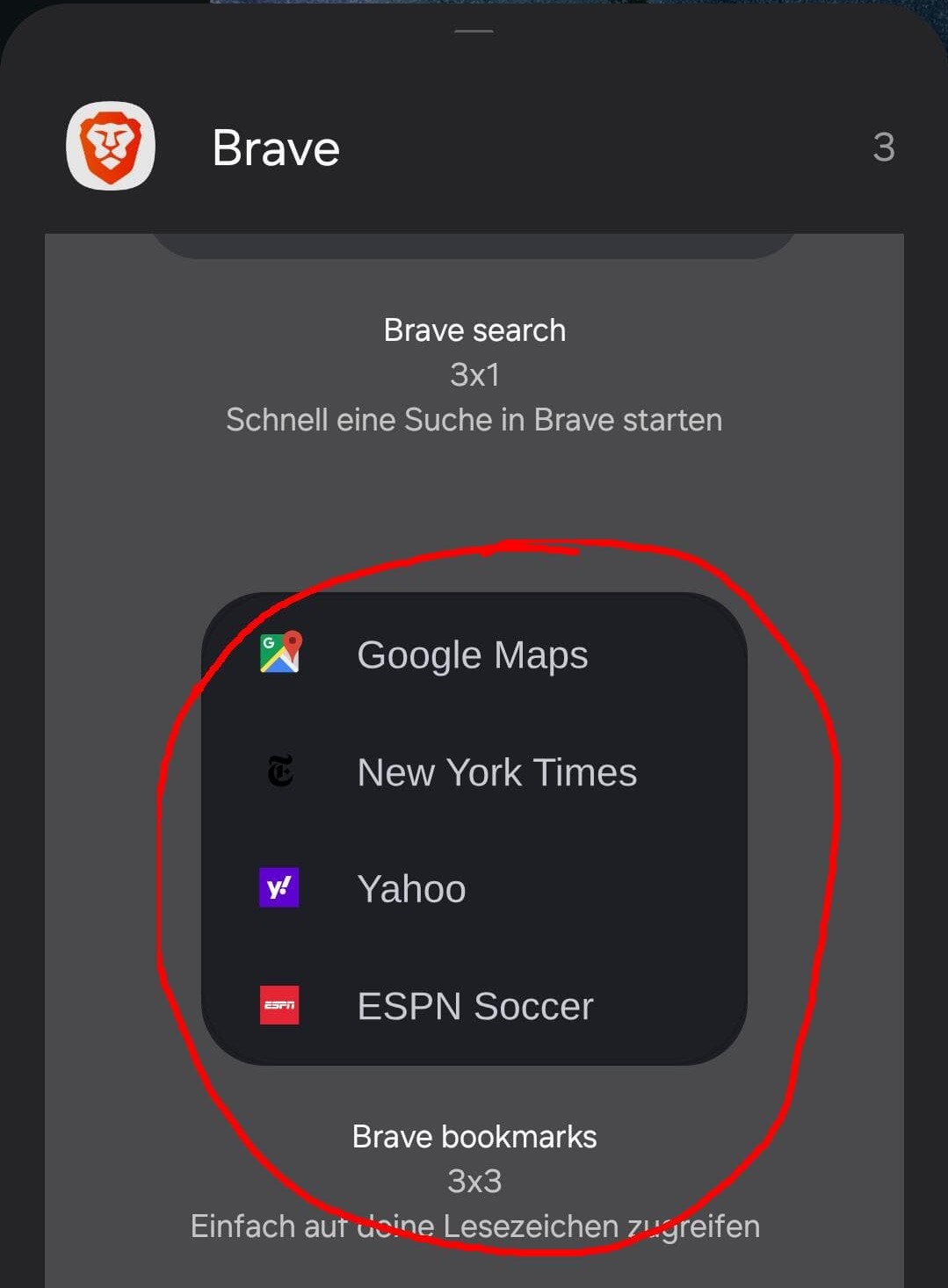
Alright. If you don’t want to install either native apps or PWAs, there’s the old-school option: you can simply set bookmarks and place the bookmark list on your home screen.
🪧 Summary and Which Apps I Still Use
In most cases, Progressive Web Apps offer the same functionality as their native counterparts but provide better privacy protection, can be customized via the browser to suit individual needs, and bypass arbitrary censorship by Big Tech companies.
There are a few apps I still keep on my phone despite the mentioned advantages. Whenever I want to retain settings for a long time without storing them in an account, a native app seems sensible to me. Sometimes, service providers as described above also prevent or ruin the use of PWAs. Currently, I have the following apps installed via F-Droid and Aurora: Comaps, AntennaPod, Nextcloud, Fossify Calendar, Breezy Weather, Thunderbird, Deezer, and DB Navigator. The last two are a thorn in my side because they share a lot of data with third parties, but both services prevent meaningful use via PWA.
The following PWAs are currently installed and I can recommend them: Mastodon, Bluesky, Lemmy, YouTube, CryptPad, Squoosh (image optimization), Pairdrop (P2P data transfer), Chess.com, and last but not least, Lichess. A larger catalog of useful PWAs can be found at PWA.directory.
- https://progressier.com/pwa-stats (last opened: 05.06.2026) https://progressier.com/pwa-stats (last opened: 05.06.2026)
- https://open-web-advocacy.org/blog/apple-backs-off-killing-web-apps/ (last opened: 05.06.2026)
- https://mozilla-services.github.io/autopush-rs/http.html#calls (last opened: 05.06.2026)
- https://arstechnica.com/google/2026/01/apps-like-grok-are-explicitly-banned-under-googles-rules-why-is-it-still-in-the-play-store/ (last opened: 05.06.2026)
- https://www.theverge.com/news/862460/apple-google-app-stores-ditch-grok-x-open-letters (last opened: 05.06.2026)
- https://www.wired.com/story/apple-took-down-ice-tracking-apps-their-developers-arent-giving-up/ (last opened: 05.06.2026)
- https://antifreeze.app/ (last opened: 05.06.2026)
- https://docs.cryptpad.org/en/FAQ.html#are-you-planning-to-make-an-app (last opened: 05.06.2026)
- https://developer.chrome.com/docs/capabilities (last opened: 05.06.2026)
- https://pwascore.com/ (last opened: 05.06.2026)
- https://feedfinder.vercel.app/ (last opened: 05.06.2026)
- https://www.giststack.com/tools/rss-feed-finder (last opened: 05.06.2026)
- https://f-droid.org/ (last opened: 05.06.2026)
- https://android.izzysoft.de/articles.php (last opened: 05.06.2026)
- https://keepandroidopen.org/ (last opened: 05.06.2026)